

What Causes Screen Blinding and Pegging?
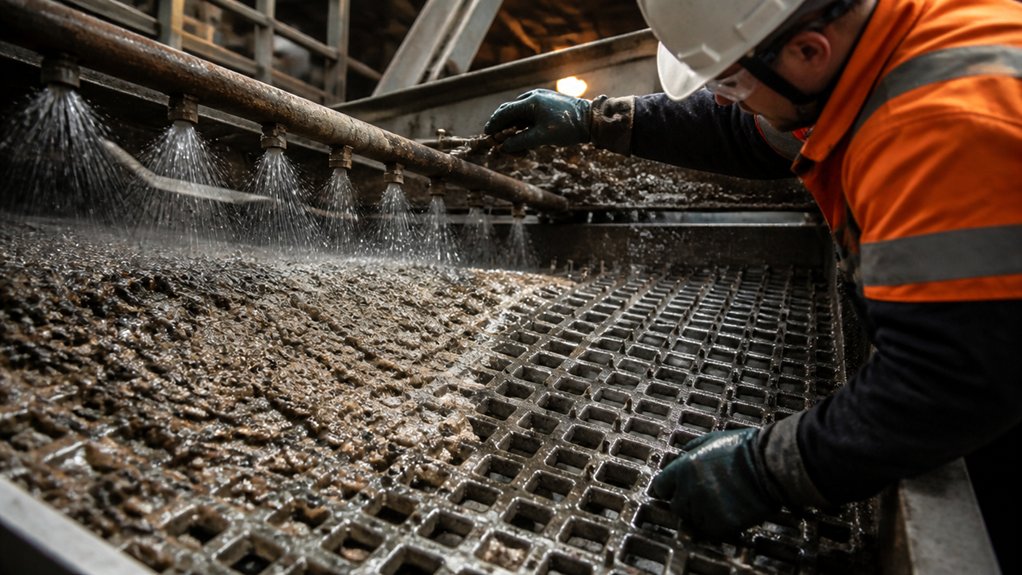
Screen blinding and pegging happen when material blocks the screen openings and reduces the amount of usable open area.
Blinding occurs when fines, moisture, or sticky material build up across the screen surface. Pegging occurs when near-size particles lodge in the apertures and resist being dislodged. Both problems reduce screening efficiency and can affect product sizing and plant throughput.
Start by checking the feed. Particle shape, size distribution, moisture, and surface texture all influence how material moves across the deck. A high feed rate can overload the screen and limit stratification. Unsuitable vibration can also leave particles trapped instead of helping them pass through or clear the openings.
The screen itself matters, too. Aperture size, open area, and wire geometry affect how easily particles pass through and how likely they’re to lodge. If blinding or pegging persists, check feed conditions and screen setup before changing operating settings.
Follow site procedures and isolate the equipment before inspecting or clearing a screen.
How Do You Clear Blinded and Pegged Screens?
Clearing a blinded or pegged screen starts with finding the cause—not just knocking material loose. Stop the machine and isolate it under your site’s lockout procedures before inspecting or cleaning the deck. Never strike a screen panel or reach beneath a moving screen.
Use only cleaning methods approved for your screen and deck, such as a fitted wash system, air jets, or brushes. Remove trapped material with suitable tools, and check the screen tension, supports, and cleaning devices for wear or damage before restarting.
Apply lubricant only to the bearings and moving parts specified by the manufacturer, using the recommended lubricant and service interval.
If pegging returns, check the feed material and operating conditions. Repeated cleaning may restore flow temporarily, but it won’t fix the cause.
Safety reminder: Keep the equipment isolated until inspection and cleaning are complete, guards are back in place, and the area is clear.
How Should You Match Screen Media to Your Material?
Match the screen media to the feed’s size distribution, shape, moisture, and abrasiveness—not just the nominal aperture. Start with the target cut, then check whether the openings will pass near-size material without catching elongated or angular particles.
Sticky or irregular feed may need self-cleaning wire or flexible polyurethane panels. For coarse, abrasive feed, consider rubber or thicker polyurethane where the deck and fastening system allow it.
Before installation, confirm that the media fits the deck and fastening system and provides enough open area for the required capacity. With mixed feed, balance passage and wear life; choosing an opening by size alone can lead to blinding, pegging, or unnecessary wear.
Before inspecting or changing media, isolate and lock out the screen, and follow your site’s safety procedures.
How Do Moisture and Operating Conditions Affect Screening?
As moisture rises, fine particles can stick to the screen media and to each other. That reduces open area and can lead to blinding. Damp, cohesive material may also form lumps that are too large to pass through the openings, even when the individual particles are small enough.
Watch for changes in feed composition and consistency, too. Uneven feed can create a deeper bed in some areas of the deck and a thinner bed in others, affecting separation and residence time. Excessive feed rate can overload the screen, while unsuitable vibration settings can limit stratification and particle passage. Temperature changes may also affect surface moisture during processing.
Track feed moisture, throughput, and screen performance together. This helps you determine whether poor separation is caused by the material, the operating conditions, or both. Before inspecting or adjusting the screen, follow site lockout procedures and make sure the equipment is isolated.
How Can You Prevent Screen Blinding and Pegging?
Preventing blinding and pegging starts with matching the screen media and operating conditions to the material. Choose an aperture and opening profile suited to the feed’s particle size, moisture, and abrasiveness. If near-size particles keep lodging in the openings, consider self-cleaning media or a different opening shape.
Keep the feed rate and bed depth under control so material spreads evenly across the deck. Overloading can reduce separation and increase buildup. Check that the screen’s stroke, speed, and inclination suit the material, and recalibrate when operating conditions change.
Keep feed moisture within a workable range where you can; wet or sticky material can quickly block openings.
Inspect screen panels regularly for wear, damage, and buildup. Before inspecting or cleaning, follow site lockout procedures and make sure the equipment is fully stopped and secured.
Train operators to recognize early signs of blinding and pegging, adjust settings appropriately, and clean the screen safely.
Conclusion
Clearing a blinded screen restores throughput, but the same conditions can cause pegging again on the next shift. Match the screen media to the feed’s size, shape, and moisture. Check feed distribution, bed depth, and screen motion against the material you’re processing. If moisture changes, adjust the process before buildup reduces open area and cuts capacity or product quality.
Inspect the screen regularly for blinding, pegging, and uneven wear, and act when you first notice a change in performance. Before any inspection or maintenance, isolate and lock out the equipment, verify it is stopped, and follow your site’s safety procedures. A few routine checks can help prevent another avoidable stoppage.